
Clustered and Non-Clustered Implementations
Introduction to Database Indexing
Database indexes help the database locate data faster by reducing the amount of data that must be read from disk.
Without an index, the database engine performs a table scan, which means reading every data page and evaluating each row until the query condition is satisfied. This approach is acceptable for very small tables but quickly becomes a bottleneck as data volume grows.
Indexes exist to avoid this cost by allowing the engine to jump directly to relevant pages.
Indexes improve:
- Query performance by reducing I/O
- Sorting efficiency by maintaining ordered structures
- Join performance by enabling fast lookups
- CPU usage by minimizing row evaluations
- Overall system throughput under concurrent load
Internally, an index is a data structure that maps key values to row locations. The database optimizer decides whether to use an index based on cost estimation, not based on whether the index exists.
Creating the right index is not about indexing everything. It is about indexing access patterns.
Clustered and Non-Clustered Implementations

A table can be organized in two fundamental ways:
- Physically ordered by a clustered index
- Unordered as a heap with optional non-clustered indexes
Understanding how each option affects storage, reads, and writes is critical for designing scalable schemas.
B-Tree Architecture: How Indexes Work
Most relational databases use B-Tree structures for indexes. This includes SQL Server, PostgreSQL, MySQL (InnoDB), and Oracle.
A B-Tree keeps data balanced and shallow, which guarantees predictable performance even as tables grow to millions or billions of rows.
Key properties:
- All leaf nodes are at the same depth
- The tree remains balanced automatically
- Lookups require a small number of page reads
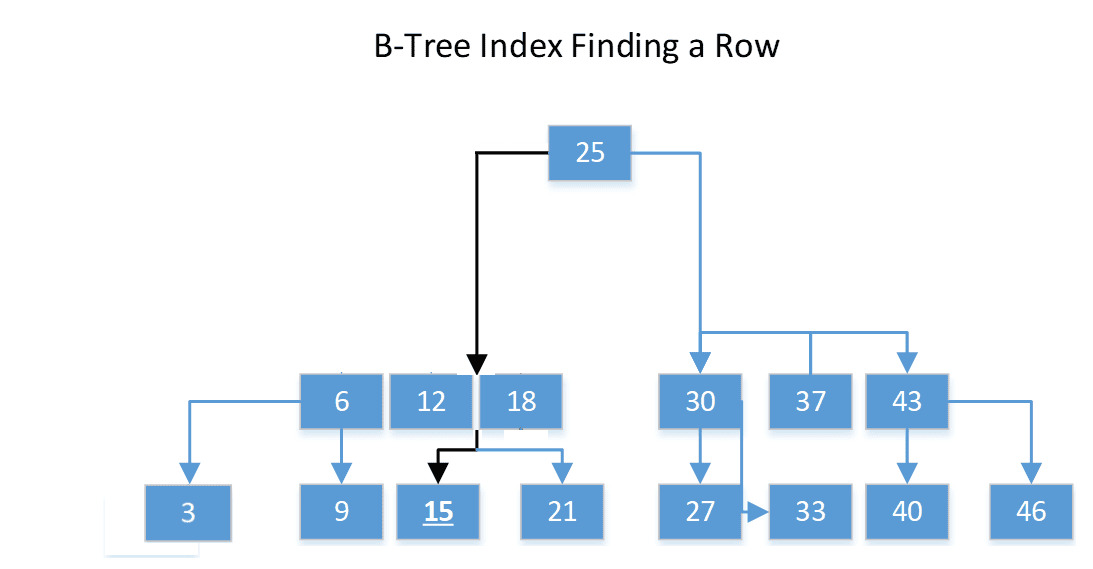
How a B-Tree Works
- The root node contains key ranges
- Intermediate nodes narrow the search range
- Leaf nodes contain either data rows or row locators
- Each page stores multiple keys to reduce tree height
Because of this design, index operations scale logarithmically with data size.
Operation Complexity
Operation      Complexity          Description
-------------------------------------------------------------------
Equality Seek  O(log n)            Direct lookup by key
Range Query    O(log n + k)        k = number of rows returned
Insert         O(log n)            May cause page split
Delete         O(log n)            May cause page merge
In practice, most index seeks require only 2 to 4 page reads, even for very large tables.
Clustered Indexes
A clustered index defines the physical order of rows on disk.
When a table has a clustered index, the leaf level of the B-Tree is the table itself. There is no separate data structure for the table rows.
Because data can only be physically ordered one way, a table can have only one clustered index.
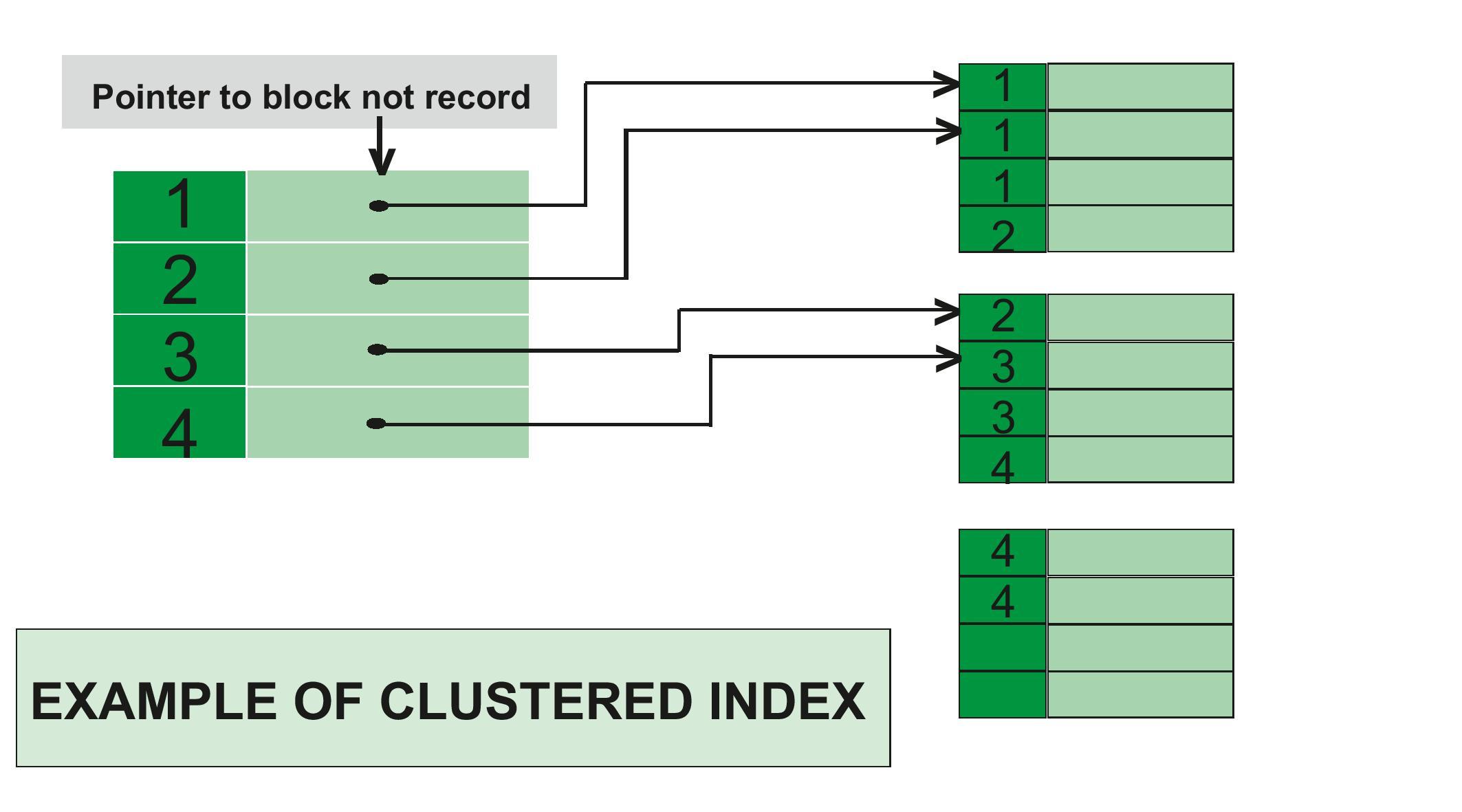
Key Characteristics
- Data pages are sorted by the clustered key
- Non-unique keys are made unique using an internal uniquifier
- Range queries are extremely efficient
- Large inserts benefit from sequential keys
- Page splits occur when inserting into the middle of the key range
Example
CREATE CLUSTERED INDEX IX_Orders_Date
ON Orders (OrderDate);
This layout is ideal for queries such as:
SELECT *
FROM Orders
WHERE OrderDate BETWEEN '2024-01-01' AND '2024-01-31';
What Happens on Disk
Page 1023 -> rows for 2024-01-01
Page 1024 -> rows for 2024-01-02
Page 1025 -> rows for 2024-01-03
The engine reads pages sequentially, which is optimal for disk and memory access.
Choosing a Good Clustered Key
A good clustered key should be:
- Narrow (few bytes)
- Immutable (rarely updated)
- Sequential when possible
- Frequently used in range queries
Bad clustered keys include GUIDs generated randomly and frequently updated columns.
Fill Factor
Fill factor controls how much free space is left on index pages during creation or rebuild.
CREATE CLUSTERED INDEX IX_Customers_Cluster
ON Customers (LastName)
WITH (FILLFACTOR = 90);
Lower fill factors reduce page splits at the cost of higher storage usage.
Composite Clustered Index
Composite keys allow finer control over ordering.
CREATE CLUSTERED INDEX IX_Orders_Composite
ON Orders (OrderDate DESC, OrderID ASC);
This supports stable ordering when multiple rows share the same date.
Non-Clustered Indexes
A non-clustered index is a separate structure that stores keys and row locators.
Unlike clustered indexes, the leaf level does not contain full rows.
What it stores depends on the table type:
- Heap: row identifier (RID)
- Clustered table: clustered key value
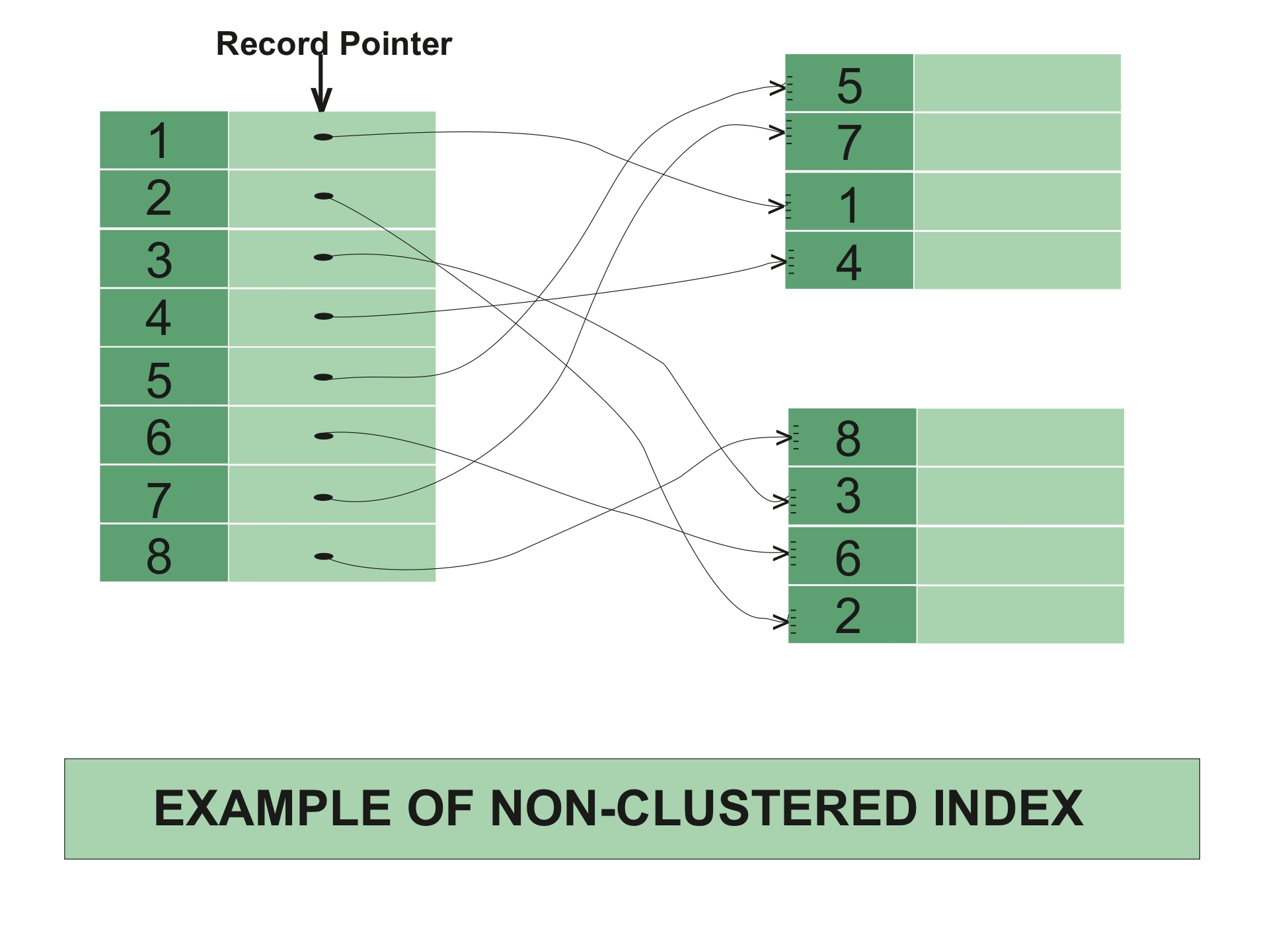
Example
CREATE NONCLUSTERED INDEX IX_Orders_Customer
ON Orders (CustomerID)
INCLUDE (OrderDate, TotalAmount);
This index supports queries that filter by CustomerID and select included columns without touching the base table.
Storage Layout Example
Index Page:
CustomerID | Row Locator
12345      | ClusteredKey = (2024-01-02, 89123)
12346      | ClusteredKey = (2024-01-05, 89188)
Key Lookups
If a query selects columns not present in the index, the engine performs a key lookup to fetch the remaining columns from the clustered index.
Covering indexes eliminate this cost.
Specialized Index Types
Filtered Index
Filtered indexes store only a subset of rows.
CREATE NONCLUSTERED INDEX IX_Users_Active
ON Users (LastLoginDate)
WHERE IsActive = 1;
Benefits:
- Smaller size
- Faster seeks
- Lower maintenance cost
Best used when predicates are stable and selective.
Columnstore Index
Columnstore indexes store data by column instead of by row.
CREATE COLUMNSTORE INDEX IX_Sales_Columnstore
ON Sales (ProductID, SaleDate, Quantity, Amount);
They are optimized for:
- Aggregations
- Scans over large datasets
- Analytics and reporting workloads
They are not ideal for heavy OLTP updates.
Index Selection Guide
Scenario                     Recommended Index            Reason
---------------------------------------------------------------------------------------
Primary Key                 Clustered                    Natural ordering
Range Queries               Clustered                    Sequential reads
Frequent Lookups            Non-Clustered                Fast seeks
Covering Queries            Non-Clustered + INCLUDE      Avoids lookups
Low Cardinality Filters     Filtered Index               Smaller footprint
Analytics                   Columnstore                 Compression and scans
Index Maintenance
Over time, inserts and deletes cause fragmentation.
Fragmentation increases:
- Page reads
- Memory usage
- CPU overhead
Maintenance Strategy
- Reorganize when fragmentation is between 5 and 30 percent
- Rebuild when fragmentation exceeds 30 percent
Smart Maintenance Script
DECLARE @IndexName NVARCHAR(255), @Fragmentation FLOAT

DECLARE IndexCursor CURSOR FOR
SELECT name, avg_fragmentation_in_percent
FROM sys.dm_db_index_physical_stats(DB_ID(), NULL, NULL, NULL, NULL) ps
JOIN sys.indexes i
  ON ps.object_id = i.object_id AND ps.index_id = i.index_id
WHERE ps.avg_fragmentation_in_percent > 5

OPEN IndexCursor
FETCH NEXT FROM IndexCursor INTO @IndexName, @Fragmentation

WHILE @@FETCH_STATUS = 0
BEGIN
    IF @Fragmentation > 30
        EXEC('ALTER INDEX ' + @IndexName + ' ON Orders REBUILD')
    ELSE
        EXEC('ALTER INDEX ' + @IndexName + ' ON Orders REORGANIZE')

    FETCH NEXT FROM IndexCursor INTO @IndexName, @Fragmentation
END

CLOSE IndexCursor
DEALLOCATE IndexCursor
Performance Comparison (10M Rows)
Operation                     Clustered     Non-Clustered      Heap
-----------------------------------------------------------------------------------
Primary Key Seek             0.003 ms      0.003 + lookup      2.1 ms
Range Query (10k rows)       12 ms         45 ms               1200 ms
INSERT (sequential)          8 ms          10 ms               5 ms
INSERT (random)              120 ms        15 ms               5 ms
UPDATE (in-place)            6 ms          9 ms                7 ms
Advanced Index Patterns
Indexed View
Indexed views materialize aggregations.
CREATE VIEW dbo.OrderSummary WITH SCHEMABINDING AS
SELECT CustomerID, COUNT_BIG(*) AS OrderCount, SUM(TotalAmount) AS Total
FROM dbo.Orders
GROUP BY CustomerID;

CREATE UNIQUE CLUSTERED INDEX IX_OrderSummary
ON dbo.OrderSummary (CustomerID);
They are useful for expensive aggregations with stable data.
Partitioned Index
Partitioning improves manageability and query pruning.
CREATE PARTITION FUNCTION OrderDateRangePF (DATE)
AS RANGE RIGHT FOR VALUES
('2024-01-01', '2024-02-01', '2024-03-01');
Often combined with sliding window strategies.
Troubleshooting Index Problems
Useful diagnostics:
SET STATISTICS XML ON;

SELECT * FROM sys.dm_db_missing_index_details;

SELECT * FROM sys.dm_db_index_usage_stats;
Never create indexes blindly based only on missing index suggestions.
Conclusion
A strong indexing strategy balances:
- Read performance
- Write cost
- Storage usage
- Maintenance overhead
Practical rules:
- Choose clustered keys deliberately
- Use non-clustered indexes to support query patterns
- Cover critical queries with INCLUDE
- Remove unused indexes regularly
- Maintain indexes based on fragmentation metrics
Indexes are not optional optimizations. They are a core part of database design.